christiant.io / reference
Token Guard Filter Pipeline
Note: Token Guard is currently in active development. Please report any bugs or issues at GitHub Issues
Token Guard Filter
Token Guard is a sophisticated OpenWebUI Pipeline-compatible filter designed to protect sensitive information in prompts before they reach external AI models. It works by tokenizing strings according to predefined regular expressions, removing sensitive content from the prompt while maintaining the ability to restore the original content for the user.
Key Features
- Regex-based Filtering: Utilizes regular expressions to identify and tokenize sensitive information
- BYOR (Bring Your Own Regex): Users can customize filtering by overwriting default regex patterns
- Reversible Tokenization: Filtered content can be restored to its original form
- Future Remote Support: Planned support for loading regex patterns from private remote repositories
How It Works
Token Guard processes prompts through these steps:
- Analyzes input text using configured regex patterns
- Replaces sensitive content with serialized tokens
- Sends sanitized prompt to the AI model
- Restores original content in the response for the user
Demo: Token Guard in Action
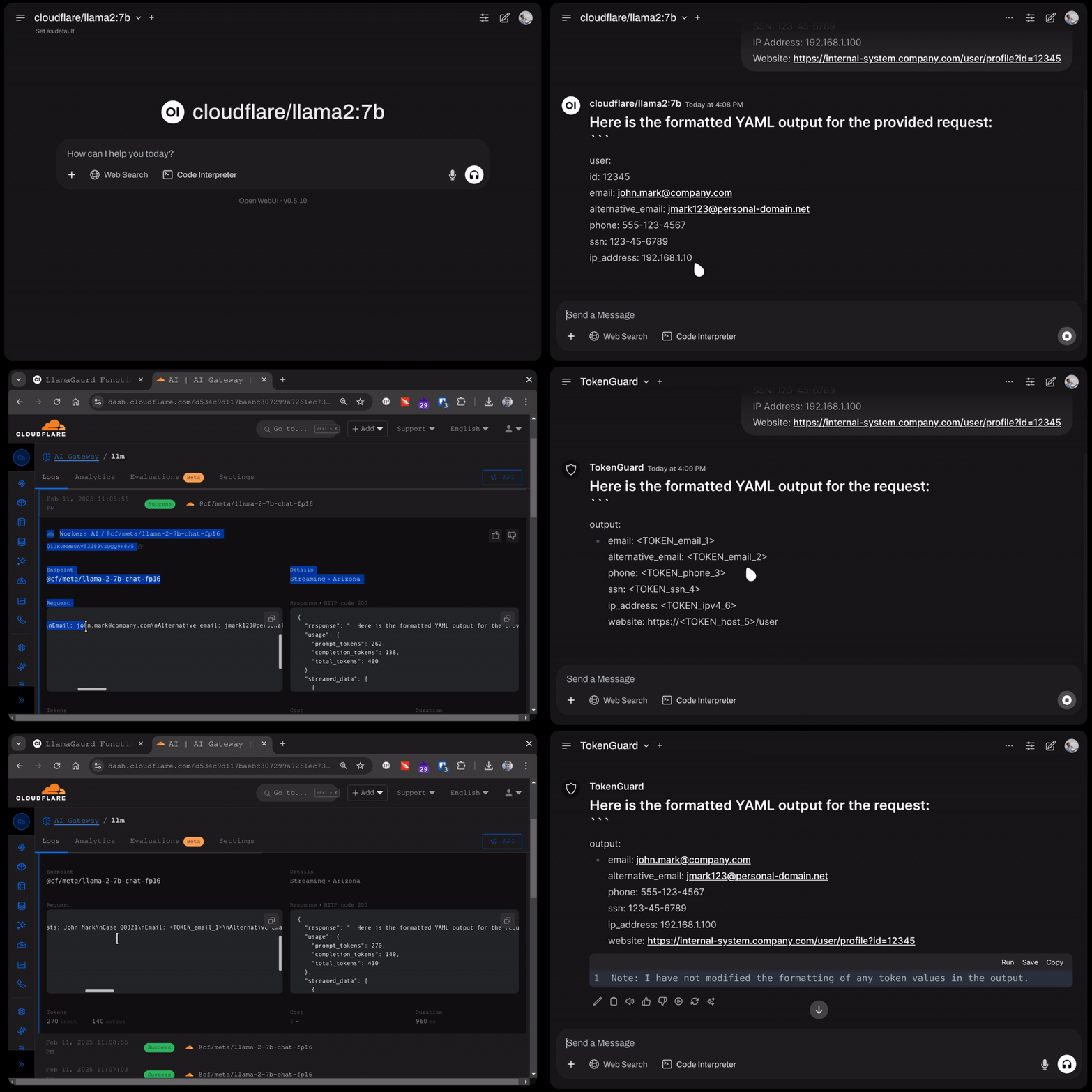
This demonstration shows Token Guard’s privacy protection capabilities:
Without Token Guard:
- Sensitive information is sent directly to CloudFlare Worker AI
- External service receives unfiltered personal data
With Token Guard Enabled:
- Sensitive content is automatically serialized
- External service only receives sanitized prompts
- Original content is safely restored in the response
Customization
Token Guard supports two methods of customization:
Current Method:
- Direct regex pattern overrides in the filter configuration
- Immediate implementation of custom patterns
Planned Feature:
- Remote loading of regex patterns from private repositories
- JSON-based pattern configuration
- Enhanced pattern management and distribution